Download 3uTools 9.07.010
Direct Download Links - free, safe and fast mirrors
680
downloads this week
37.1K
all time
182MB
file size
updated
Aug 5, 2026
EXT Main LINK
3uTools 9.07.010
x64
3uTools_v9.07.010_Setup_x64.exe
EXT Main LINK
3uTools 9.07.010
3uTools_v9.07.010_Setup_x86.exe
EXT Main LINK
3uTools 3.29.009
3uTools_v3.29.009_Setup_x86.exe
EXT Main LINK
3uTools 3.29.009
x64
3uTools_v3.29.009_Setup_x64.exe
EXT Main LINK
3uTools 3.18.008 for macOS
macOS
3uTools_v3.18.008.dmg
EXT Main LINK
3uTools 9.05.007 - for macOS (Intel Chip)
macOS
3uTools_v9.05.007_x64.dmg
EXT Main LINK
3uTools 9.05.007 - for macOS (Apple Silicon)
macOSARM64
3uTools_v9.05.007_arm64.dmg
Have you used 3uTools?
Share your experience - write a review or leave a comment
What is 3uTools?
3uTools is a free Windows and macOS application for managing an iPhone or iPad from a computer without iTunes. It handles file transfers, local backups, firmware flashing and battery diagnostics from one interface, and it never asks for an Apple ID. Every feature is free, with no paid tier and no account to create.
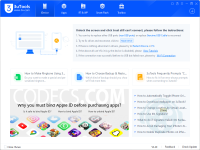
How to Download 3uTools
- 1 Click the DOWNLOAD button for your preferred link (US/EU Main or Mirror). When prompted by your browser, choose "Save" and select a destination folder.
- 2 We recommend using the mirror links (EU MIRROR / US MIRROR) first - they tend to be faster and more reliable than external sources.
- 3 Having trouble downloading 3uTools? If the download doesn't start, click the link again or try a different browser (Firefox/Chrome). Some security software may block downloads due to false positives.


